
Zapier vs Make vs n8n: Which Automation Tool Should You Use in 2026?
What is automation software and do you actually need it? Plain-language explanation of Zapier, Make, and n8n — what they do, who they are built for, and how the costs compare at scale.

✅Fact-Checked: Pricing verified from official platform pages (May 2026). Comparative data sourced from DigitalApplied.com (February 2026), AutomationAtlas.io (March 2026), Zapier's own n8n vs Make guide (March 2026), and OctaveHQ (2026). Sources listed at end.
Choosing the wrong automation tool costs more than the subscription fee — it costs the migration time when you outgrow it. Zapier, Make, and n8n are the three dominant automation tool options in 2026. Each is built for a different type of team with different technical capacity. At 50,000 workflow runs per month, Zapier costs $1,500+. n8n self-hosted costs $50. That gap compounds significantly at scale.
Every morning you manually copy new customer email addresses from your website into a spreadsheet. Then you copy those into your email marketing tool. Then you check if a new payment came in and manually update another sheet. An hour of your day, every day, doing the same thing.
That is exactly the kind of task automation tools exist to eliminate.
Zapier, Make, and n8n are all automation platforms — they connect the different software tools your business uses and make them talk to each other automatically, without you doing anything manually. But they are not the same tool. They serve different types of users, charge very differently at scale, and have meaningfully different technical requirements.
This guide starts with a plain explanation of what automation tools actually are and what each of these three does — before any comparison or pricing. Read this first if automation is new to you.
Related Articles:
Claude for small business
Best AI Tools to Make Money Online
AI side hustles using automation
🔍 How This Was Built: Pricing data verified from official platform pages in May 2026. Volume cost comparisons sourced from independent scaling analyses. NerdStake has no commercial relationship with Zapier, Make, or n8n.
Not sure which AI tool is actually worth paying for in 2026? NerdStake has the comparison that skips the commission-first rankings
- →Zapier is easiest to start with — 7,000+ integrations, no-code, non-technical teams running in hours. But the per-task pricing gets expensive fast at scale.
- →Make offers 60% lower cost than Zapier at equivalent volume with more powerful visual workflow logic. Best mid-market choice for SMBs.
- →n8n self-hosted is free for unlimited executions. A $50/month server handles what costs $1,500+/month on Zapier. Best value at scale.
- →The three platforms measure usage differently: Zapier = per task, Make = per operation, n8n = per full workflow execution. This matters enormously for cost at scale.
- →n8n leads on AI agent support in 2026 — native LangChain, persistent memory, multi-agent orchestration. Make is mid-tier. Zapier democratises AI but with less flexibility.
- →n8n self-hosted is the only option for complete data sovereignty — essential for healthcare, finance, and GDPR-regulated operations.
What Is Automation Software and Do You Actually Need It?
Automation software does one thing: it watches for something to happen
in one tool and then automatically does something in another tool,
without you being involved.
Here are some real examples of what that looks like in practice:
- Someone fills in your website contact form → their details are
automatically added to your email list and a welcome email sends. - A customer pays for something on your online store → a receipt goes
to their inbox, a row is added to your accounts spreadsheet, and
your inventory count updates. - You publish a new blog post → it is automatically shared to your
social media accounts and a notification goes to your Slack.
None of those things required you to do anything. You set up the
automation once. It runs every time the trigger happens.
Do you need it? If you are spending more than 2–3 hours per week
doing the same repetitive task between your business tools, an
automation platform can likely eliminate most of that. If your
business is very small and your tools are minimal, you might not need
one yet.
Now — what each of these three tools actually is.
Zapier — The One Built for Non-Technical People
In plain terms: Zapier is the easiest automation tool available.
It works on a simple logic: when this happens in this app, do
that in that app. You select the trigger, you select the action,
and it runs. No technical knowledge required.
The analogy that works: Zapier is like a universal remote control for
your business software. It does not matter which brands of software
you use — Zapier almost certainly connects them. With over 7,000
different apps supported, if your business uses a mainstream tool,
Zapier talks to it.
The tradeoff: Zapier's pricing is based on how many individual actions
run each month. Every step in every automation counts. At low volumes
this is fine. As your business grows and automations multiply, the
cost can climb quickly.
Who it is built for: Small business owners and entrepreneurs who
have never set up automation before and need something running within
a day — not a week. No technical background required.
Starting price: $19.99/month for 750 tasks.
Make — The More Powerful Middle Ground
In plain terms: Make (previously called Integromat) is a visual
automation tool where you build your workflows on a canvas — like a
flowchart on screen. You can see each step connected to the next
with lines and nodes, which makes it easier to build and understand
complex automations compared to Zapier's more linear approach.
The canvas interface sounds more complicated, but it has a real
advantage: you can build workflows that branch, loop, and handle
exceptions in ways that Zapier cannot. And at comparable volumes,
Make typically costs 60% less than Zapier.
Think of Make as Zapier's more capable, better-value sibling. It
takes a few more hours to learn, but handles more complex business
logic and becomes significantly more cost-effective as your
automation volume grows.
Who it is built for: Small and medium businesses with some
technical comfort — or a team member willing to spend a weekend
learning — who need more powerful automation than Zapier provides
at a lower ongoing cost.
Starting price: $9/month for 1,000 operations.
n8n — The Free, Self-Hosted Option for Technical Teams
In plain terms: n8n (pronounced "n-eight-n") is an open-source
automation tool. "Open-source" means the software itself is free to
use — anyone can download it and run it on their own server.
Here is the practical meaning of that: instead of paying a monthly
subscription, you pay only for the server that runs n8n. A small
server costs around $50 per month and can handle an enormous volume
of automations — the equivalent of what would cost $1,500+ on Zapier.
The significant catch: setting up your own server requires some
technical knowledge. n8n is not for beginners or non-technical teams.
But for businesses with a developer, or entrepreneurs comfortable with
technical tools, the cost saving at scale is dramatic.
n8n also has the most advanced AI capabilities of the three in 2026 —
built-in support for connecting multiple AI tools together in complex
sequences (called LangChain), which matters if you are building
AI-powered automation workflows.
Who it is built for: Developer-led teams, technical entrepreneurs,
regulated industries that cannot send data to third-party cloud servers
(healthcare, finance, GDPR-sensitive businesses), and high-volume
operations where per-task pricing is becoming expensive.
Price: Free if self-hosted. Cloud-managed plan from $24/month.
The Pricing Models — Where Most Comparisons Get It Wrong
These three platforms do not measure usage the same way. That makes side-by-side pricing comparisons misleading if you do not understand the difference.
- Zapier charges per task — each action in each workflow run. A 5-step workflow costs 5 tasks per run.
- Make charges per operation — similar to tasks but with slightly different counting logic.
- n8n (cloud) charges per workflow execution — the entire run, regardless of how many steps it contains. A 20-step workflow costs the same as a 2-step workflow.
What this means at scale: A lead qualification workflow with 5–8 steps costs Zapier 5–8 tasks per lead. At 5,000 leads per month, that is 25,000–40,000 Zapier tasks. The same workload on n8n: 5,000 executions. At high volume, the gap becomes significant — a self-hosted n8n instance eliminates per-execution costs entirely.
Zapier — The Non-Technical Team Standard
Who it is for: Teams without developer resources who need automation running this week, not next month.
Zapier pioneered no-code automation and remains the benchmark for ease of use. The 7,000+ integration library means almost any SaaS tool your team uses is already supported. The linear, guided workflow builder (Trigger → Action) guides non-technical users through creating automations without any technical knowledge.
The 2026 additions — Zapier Agents (autonomous AI systems operating across integrated apps) and Copilot (natural language workflow creation) — make Zapier the most accessible AI automation platform in this comparison.
The honest cost reality: Most teams outgrow their starter plan within 6 months of meaningful automation. The per-task pricing model becomes expensive fast. A team running 25,000 tasks/month is spending significantly more than the starter tier suggests.
💡 Golden Tip: If your team is non-technical and you need automation running quickly across mainstream SaaS tools, start with Zapier. But document your workflow volume from day one. When your monthly task count exceeds 10,000, run a Make cost comparison — the difference typically justifies a migration.
Make — The Price-to-Power Champion
Who it is for: SMBs and mid-market teams with moderate technical comfort who need complex workflow logic at a competitive price.
Make's canvas-based visual builder handles branching logic, iterators, parallel processing, and data transformations that Zapier's linear approach cannot. At comparable automation volume, Make typically costs 60% less than Zapier while supporting significantly more sophisticated workflow designs.
The 2026 Maia AI assistant builds automation scenarios from natural language descriptions. The free tier is the most generous in this comparison: 1,000 operations/month with two active scenarios — enough to prove genuine value before any cost commitment.
Make is part of the Celonis ecosystem, with European data infrastructure — a meaningful point for GDPR-sensitive teams who want managed cloud hosting rather than self-hosting.
Where it falls short: Integration breadth. Make's 1,500+ integrations cover most common services but trail Zapier's 7,000+. For teams using niche SaaS tools, this is occasionally a blocker.
n8n — The Developer and Scale Solution
Who it is for: Developer-led teams, regulated industries (healthcare, finance), and any operation where per-execution costs are becoming a serious budget concern.
n8n is open-source and self-hostable — meaning your data never leaves your servers. For GDPR-regulated businesses, healthcare operations, and financial services, this is not a nice-to-have; it is often a compliance requirement that eliminates Zapier and Make as options entirely.
The 2026 v2.0 launch added: the AI Agent Tool Node for multi-agent orchestration, native LangChain integration, persistent agent memory, and the Save & Publish workflow for safer production deployments. For teams building AI-powered automation with Claude, ChatGPT, or Gemini integrations, n8n's native AI agent support is more capable than either Zapier or Make.
The cost reality: A $50/month VPS handles what would cost $1,500+ on Zapier at 50,000 executions per month. The learning curve is real — n8n's node-based interface is built for users who understand data flows and API concepts. Non-technical teams should not start here.
📌 What Most Blogs Don't Tell You: Most businesses follow the same platform progression: Zapier first (fast, accessible), Make when complexity and cost force an upgrade, n8n when data compliance or scale economics become the priority. If you can identify which stage you are at now, you can avoid the migration cost by starting with the right tool.
The Scaling Cost Comparison
A mid-size operations team running 50,000 workflow executions per month across marketing, sales, and support:
- Zapier: ~$1,500+/month (at multi-step workflows)
- Make: ~$300–500/month (same volume, lower per-operation cost)
- n8n self-hosted: ~$50/month (VPS server cost — execution is unlimited)
- n8n cloud: ~$150–250/month (managed, still significantly cheaper than Zapier)
The difference compounds over 12 months. Zapier at $1,500/month versus n8n at $50/month is $17,400 per year — enough to justify substantial developer time spent on the n8n migration.
AI Automation in 2026 — Which Platform Wins
All three platforms added AI agent capabilities in 2026. The hierarchy is clear:
n8n — most advanced. Native LangChain, persistent agent memory, AI Agent Tool Node for multi-agent orchestration. For teams building complex AI workflows that connect multiple LLMs, this is the clear leader.
Make — intermediate. Make AI Agents launched in late 2025 with solid AI service integrations. Less flexible for custom AI orchestration than n8n, but more accessible to non-developer teams.
Zapier — most accessible. Zapier Agents and Copilot democratise AI automation without technical knowledge. For teams that need AI-connected workflows without developer support, Zapier remains the most approachable option.
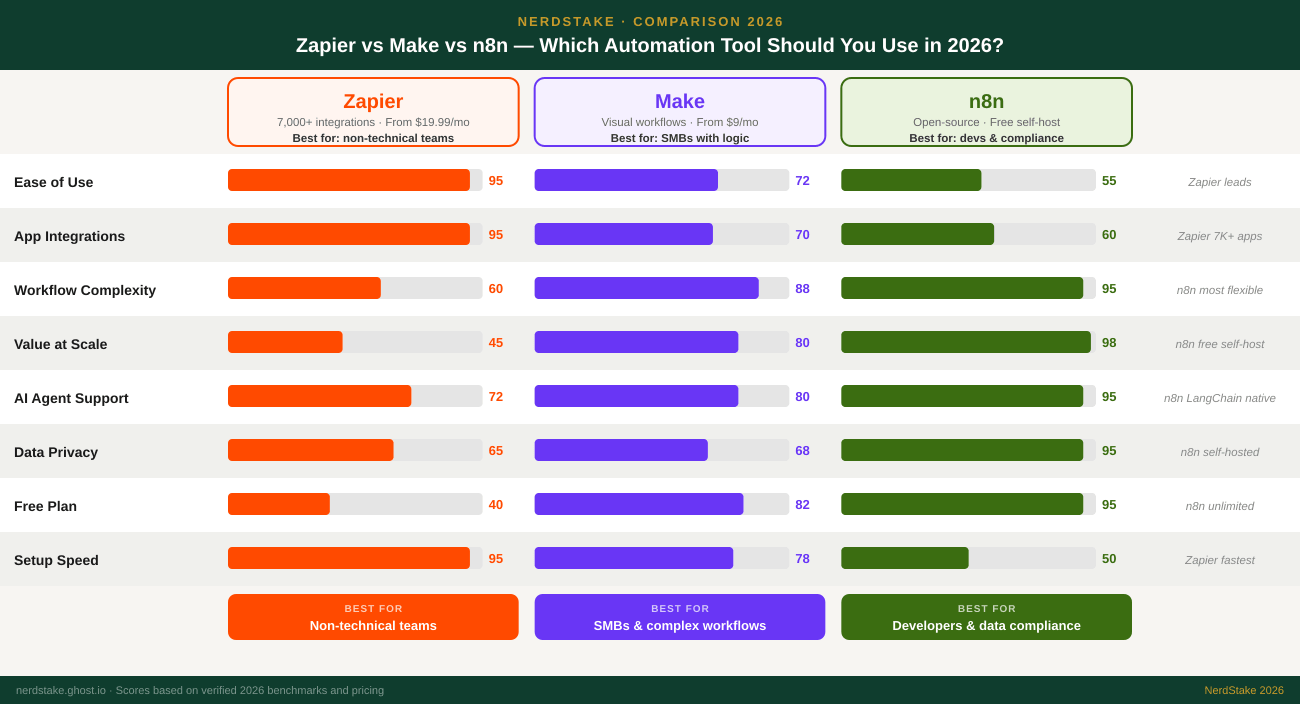
| Your Situation | Best Pick | Why |
|---|---|---|
| Non-technical team, need it running fast | Zapier | No-code, beginner-ready, 7,000+ integrations. Running in hours not weeks. |
| Need complex multi-step logic at low cost | Make | Visual branching logic at 3–5× lower cost than Zapier at equivalent volume. |
| Running high-volume automation (>10K runs/mo) | n8n | Per-execution pricing + self-hosting eliminates the cost cliff that hits Zapier users at scale. |
| Healthcare, finance, or GDPR compliance | n8n | Only platform with complete data sovereignty via self-hosting — data never leaves your servers. |
| Building AI agent workflows (LLM-connected) | n8n | Native LangChain, persistent memory, multi-agent orchestration — most capable in 2026. |
| SMB on a budget, moderate technical comfort | Make | Best price-to-power ratio — generous free tier, visual builder, 60% cheaper than Zapier. |
| Currently on Zapier, costs are climbing | Make (migrate) | Most common migration path from Zapier. Preserves visual workflow approach with lower cost. |
"I use Make for NerdStake's content automation workflows — the visual canvas makes complex branching logic manageable without a developer. If NerdStake ever scales to the point where Make's costs become meaningful, n8n self-hosted is the obvious next step."
The framework that actually matters: if you cannot name a developer on your team, start with Zapier or Make. If your monthly automation volume is climbing past 10,000 executions and you are watching the Zapier bill grow, run a Make cost comparison now — the migration is easier at 10 workflows than at 50. And if data compliance is a non-negotiable, n8n self-hosted is the only answer in this list regardless of what the other comparisons tell you.
Sources & References
- DigitalApplied.com, Zapier vs Make vs n8n 2026: Automation Comparison — February 2026
- AutomationAtlas.io, Zapier vs Make vs n8n: Pricing & Features Tested (2026) — March 2026
- Zapier, n8n vs Make: Which is Best? — March 2026
- OctaveHQ, n8n vs Zapier vs Make: Complete 2026 Comparison Guide — 2026
- Flowmondo, n8n vs Zapier vs Make — 2026
- FinByz, n8n vs Zapier vs Make: The Complete 2026 Comparison — January 2026
- Zapier, Make, and n8n official pricing pages — verified May 2026
Written by Samuel Mekonnen, Founder of NerdStake. NerdStake has no commercial relationship with Zapier, Make, or n8n.
Read more

How Much Does It Cost to Start an Affiliate Blog in 2026?
The minimum cost to start an affiliate blog in 2026 is $35–$55 per month. That covers hosting, a domain, and a free email marketing platform. The full setup including an SEO research tool runs $70–$90 per month. Here is every cost broken down, what each one buys, and

ConvertKit vs Mailchimp: Which Is Better for a Complete Beginner in 2026?
The short answer: for a new blogger or content creator building an email list from zero, ConvertKit is the better fit. Mailchimp is a broader marketing platform built for businesses running promotional campaigns. ConvertKit is built specifically for individual creators and bloggers. The distinction matters more than most comparison articles

Is Semrush Free Tier Enough for a New Blog?
The short answer: yes — for the first 3 to 4 months of a new blog, Semrush's free plan is sufficient. Ten keyword searches per day is more than enough when you are publishing one or two articles per week. The free tier becomes a genuine constraint only when

Proven AI Side Hustles That Actually Make $5,000/Month
Real AI side hustles ranked by income potential and time required — verified data, honest timelines, no hype